Welcome to SoundDog for Mac OS X
What does it do?
SoundDog is a simple QuickTime-based applescript droplet that acts as a sound inspector. It is designed to be placed in your Dock so that you can quickly drag and drop any audio file(s) onto SoundDog's icon to hear playback and view a detailed description of the file. Current version is v1.0.5.
- Mac OS X 10.4 to 10.9, QuickTime Player 7
- Utilizes QuickTime Player 7 and Applescript
- Note: In OS X starting with Snow Leopard you must have the optional QuickTime 7 installed. SoundDog does not work with the limited functionality of QuickTime X.
- Name
- Path to File
- Playtime
- File Size
- Audio Format, stereo or mono
- Bit Depth
- Sample Rate
- File Type
- File Creator
- Data Type
- Date Created
- Date Modified
Download the SoundDog v1.05 disk image. Updated for Mavericks: Mount it on your desktop and copy the application to the Applications Folder on your startup volume. Place the application in your dock for easy access at all times.
To place SoundDog in the Finder window toolbar, hold the command key while dragging the icon there.
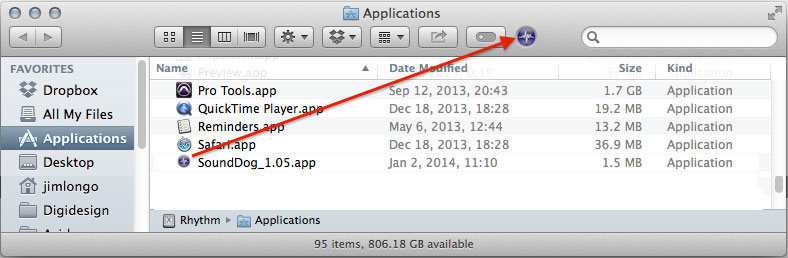
For PowerPC computers you will need SoundDog v1.03
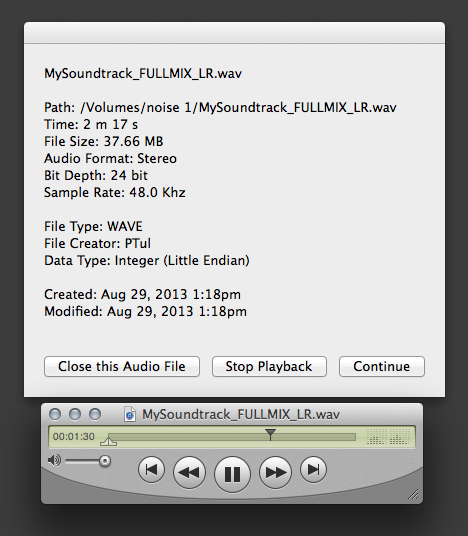
Drag and Drop the audio file(s) in question onto the SoundDog icon and it will launch QuickTime to play the file and display its properties.
Click on 'Stop Playback' to halt playback, "Continue" to resume. Click on 'Close this Audio File' to close the display and the current QuickTime transport. If you have dropped multiple files clicking on 'Close' will then open the next file in sequence.
You can also use the QuickTime transport to control playback of the current file.
- Version 1.0.5 - released Jan 1, 2014
- Version 1.0.4 - released Aug 2, 2012
- Version 1.03 - released March 8, 2008
- Version 1.02b - released July 25, 2006
- Version 1.02 - released May 2, 2005
- Tiger and QT7 compatibility
- added "File Path" to display
- added "Continue" button to dialog
- added multichannel info to "Format" display in QT7
- Version 1.01 - released September 24, 2004
- added file size to display
- changed Time format to m and s
- Version 1.0 - released August 26, 2004
- QuickTime 6 users don't get "Path" information in display
- SoundDog is limited by your QuickTime version. QT6 users can only playback and inspect audio files up to 48khz, while QT7 users can work with 192khz, 32bit multichannel audio.
- Apparent hang can be caused by "Get QuickTime Pro" dialog behind finder windows. Make QuickTime active and dismiss dialog.
- SoundDog doesn't understand split-stereo files . . . sorry ProTools users.
- If you recieve an OS error message when trying to first launch SoundDog about the app being from an unrecognized developer you should use the contextual menu to open SoundDog for the first time. See this knowledge base article for more information.
- Applescript routines for date format, and file size courtesy of Nigel Garvey
- Icon design by Kevan Staples
Please email me to let me know of any difficulties you encounter, suggestions you have or just to say hi.
Jim Longo
January 2014